
Cron Expression Generator
Build a cron schedule by choosing minutes, hours, days, months and weekdays — or paste an existing crontab line — and see it explained in plain English with the next ten run times. Supports lists, ranges, steps, month and weekday names and the @daily-style shortcuts.
- Free to use
- No sign-up
- Runs in your browser
Generate and check a cron expression
Cron & Scheduling Cheat Sheet
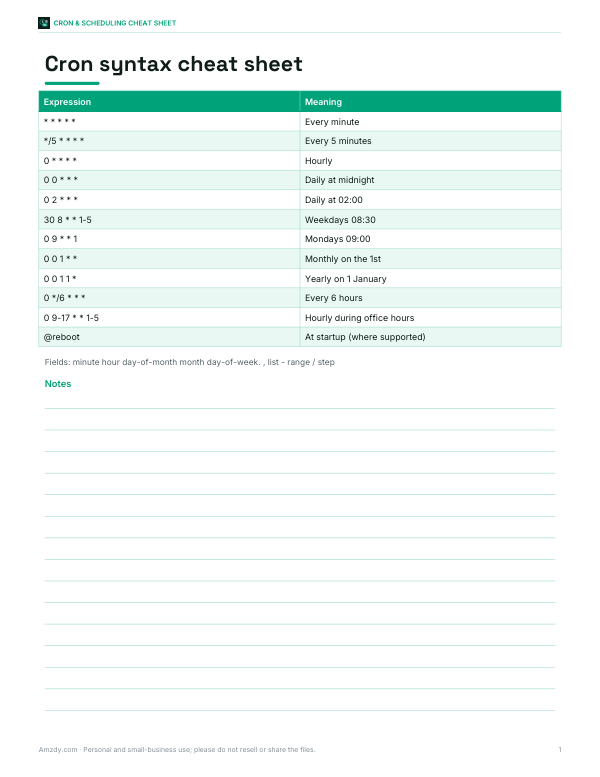
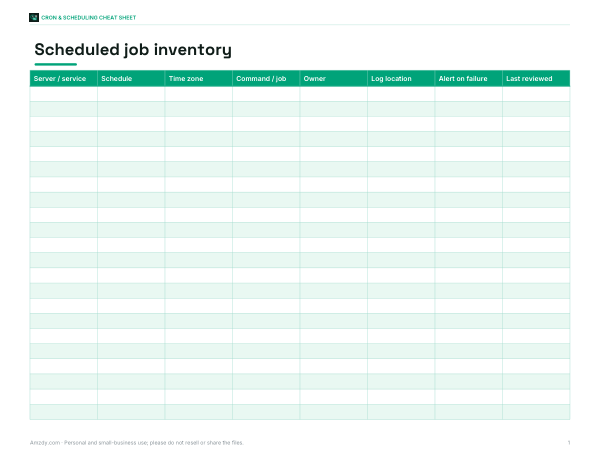
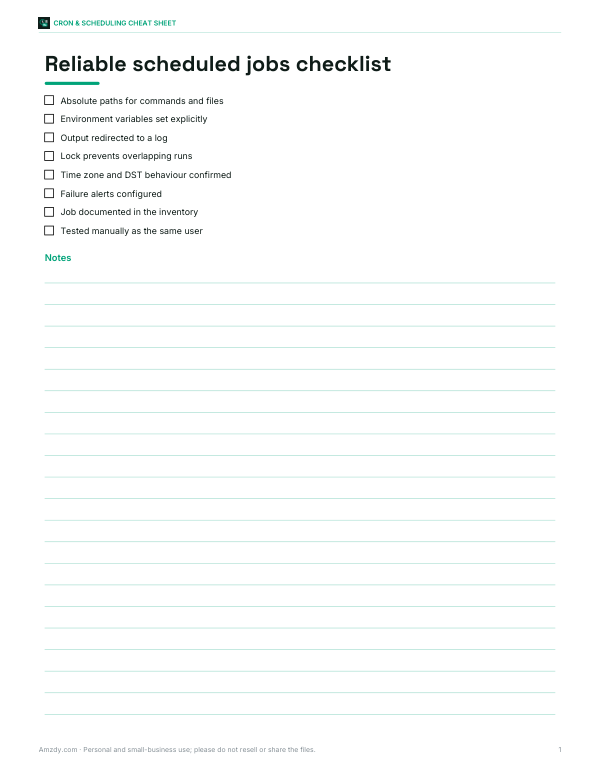
A printable cron syntax cheat sheet, a job inventory workbook for your servers and a checklist for reliable scheduled jobs.
- Cron cheat sheet (PDF, XLSX)
- Job inventory (XLSX, PDF)
- Reliability checklist (PDF, DOCX)
Formats: PDF, XLSX, DOCX. Instant download after payment (link valid 72 hours, up to 5 downloads). AI-assisted: the templates were drafted with AI help and reviewed and laid out before publishing.
$5.00 USD, one-time 3 files · about $1.67 each
- Instant download
- 7-day refund
- Secure checkout by Stripe
7-day money-back guarantee. Full refund within 7 days of purchase, even after you download.
Full refund within 7 days — see the refund policy and license.
Free printables
Single sheets you can print right now, no sign-up. The full pack adds every sheet in one download plus the editable files.
How cron expressions work
Cron is the time-based job scheduler on Unix-like systems, and its five-field syntax is also used by many cloud schedulers, CI pipelines and application frameworks. Each line tells cron when to run a command. The five fields, separated by spaces, are:
| Field | Allowed values | Example |
|---|---|---|
| Minute | 0–59 | 30 |
| Hour | 0–23 | 8 |
| Day of month | 1–31 | 1 |
| Month | 1–12 or JAN–DEC | * |
| Day of week | 0–6 (Sunday = 0; 7 also means Sunday) or SUN–SAT | 1-5 |
The job runs whenever the current time matches every field. So 30 8 * * 1-5 means “at 08:30 on Monday through Friday”.
Special characters
| Symbol | Meaning | Example |
|---|---|---|
| * | Every value | * in hour = every hour |
| , | List | 1,15 = on the 1st and 15th |
| - | Range | 9-17 = 9 through 17 |
| / | Step | */15 = every 15 minutes; 0-30/10 = 0,10,20,30 |
Shortcuts such as @hourly, @daily, @weekly, @monthly and @yearly are accepted by many cron implementations and are expanded by this tool into their five-field equivalents.
The day-of-month and day-of-week rule
One detail catches many people out. When both the day-of-month and day-of-week fields are restricted (neither is *), standard cron runs the job when either matches, not both. 0 9 1 * 1 runs at 09:00 on the 1st of every month and on every Monday. To run only on Mondays that fall on the 1st, you need a check inside the script. The explanation and next-run list on this page follow this standard behaviour.
Worked examples
| Expression | Meaning |
|---|---|
| */5 * * * * | Every 5 minutes |
| 0 * * * * | At the start of every hour |
| 0 2 * * * | Every day at 02:00 |
| 30 8 * * 1-5 | Weekdays at 08:30 |
| 0 0 1 * * | At midnight on the 1st of each month |
| 0 6 1 1,4,7,10 * | At 06:00 on the first day of each quarter |
| 15 3 * * 0 | Sundays at 03:15 |
| 0 9-17 * * 1-5 | Every hour from 09:00 to 17:00 on weekdays |
Time zones
Classic cron uses the system time zone of the server it runs on. Many cloud schedulers — for example in container platforms and serverless services — run cron in UTC unless you configure otherwise. The next-run list can show times in your own time zone or in UTC; if your job runs on a server, choose the zone the server uses. Watch out for daylight saving time: a job scheduled at 02:30 may run twice or not at all on the night the clocks change in some regions.
Cron dialects
This tool follows standard five-field Unix cron. Some systems extend it: Quartz and Spring use six or seven fields with seconds (and optional years) at the front and allow ?, L, W and #; AWS EventBridge uses six fields including year; Jenkins adds H for hashed spreading. If you are writing for one of those systems, check its documentation — the core ideas of lists, ranges and steps are the same.
Crontab tips
- Use absolute paths in commands; cron runs with a minimal environment and PATH.
- Redirect output to a log file:
command >> /var/log/job.log 2>&1. - Avoid scheduling many jobs at exactly minute 0; spread them to reduce load spikes.
- Use a lock (for example
flock) if a job might still be running when the next one starts. - Edit with
crontab -eand list withcrontab -l; the last line should end with a newline. - Test the command manually as the same user before scheduling it.
Scheduling patterns that scale
As the number of scheduled jobs grows, a few patterns keep things manageable. Keep one inventory listing every job, its schedule, owner and purpose. Stagger heavy jobs so backups, report generation and data imports do not all start at 02:00. Prefer idempotent jobs that can safely run twice, so a retry after a failure causes no harm. For tasks that must run exactly once across several servers, use a scheduler that supports distributed locking rather than identical crontabs on every machine. And alert on failure and on silence: a job that stops running quietly is harder to notice than one that errors.
Debugging a job that does not run
If a scheduled job never seems to run, check the basics in order: is the cron service running; is the expression what you think (paste it here to confirm the next run times); does the command work when run by hand as the same user; does it rely on environment variables or a working directory that cron does not provide; and is its output being discarded? Adding a line that writes the date to a log file at the start of the script quickly shows whether cron is starting it at all, which separates scheduling problems from script errors.
Frequently asked questions
What does * * * * * mean?
Run every minute of every hour of every day.
How do I run a cron job every 5 minutes?
Use */5 * * * *.
Is Sunday 0 or 7?
Both are accepted in most implementations; 0 is standard, and this tool treats 7 as Sunday too.
Why does my job run on extra days?
If both day-of-month and day-of-week are restricted, cron runs when either matches.
What time zone does cron use?
The server's time zone for classic cron; many cloud schedulers default to UTC.
Does this support seconds?
No, it follows standard five-field cron. Quartz-style schedulers add a seconds field.
Can cron run a job every 30 seconds?
Not directly; the smallest unit is one minute. A common workaround is two entries, one running the command and one running “sleep 30; command”, or a scheduler that supports seconds.